
what is so called proxy ?
Introduction to proxy (noobs-friendly)Today i will Explain you what is "Proxy" how they help Internet users (mostly it helps peoples using internet illegaly) in different ways and i will explain its methodology too to you.
Proxy acts as intermediate between user and web server.
Proxy changes your ip address or it will convert your request into a protocol allowing you to content that server.
Just take the example of one student living in hostel where he have access to Internet but some websites (social networking sites) like Facebook,Twitter,Myspace are not allowed to access. so he get the help of proxy site and through proxy he can access Facebook etc now , this encodes the URL & Page and will not allow the server to identify your computer too. this was just scenario of student living in hostel.
But Hackers use proxy in many ways for example: he can enter into a corporate firewalls just by imitating the IP own the victim who is already inside the firewall network.
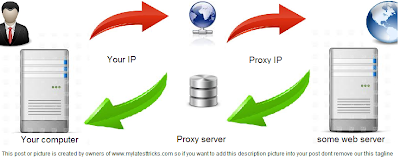
Here is the Simple explanation on how proxy servers work :D
Example of Proxy site created as demo by Noman Ramzan > http://3night.3owl.com/
Some uses of Proxy.
1. using caching
2. can be used to be anonymous
3. to bypass parental control of pc.
4. to avoid internet filtering to access content
5. to scan transmitted content for malware before delivery
6. used by people using internet for illegal purposes.
( come back soon for interesting posts www.mylatesttricks.com )
Proxy acts as intermediate between user and web server.
Proxy changes your ip address or it will convert your request into a protocol allowing you to content that server.
Just take the example of one student living in hostel where he have access to Internet but some websites (social networking sites) like Facebook,Twitter,Myspace are not allowed to access. so he get the help of proxy site and through proxy he can access Facebook etc now , this encodes the URL & Page and will not allow the server to identify your computer too. this was just scenario of student living in hostel.
But Hackers use proxy in many ways for example: he can enter into a corporate firewalls just by imitating the IP own the victim who is already inside the firewall network.
Here is the Simple explanation on how proxy servers work :D

Example of Proxy site created as demo by Noman Ramzan > http://3night.3owl.com/
Some uses of Proxy.
1. using caching
2. can be used to be anonymous
3. to bypass parental control of pc.
4. to avoid internet filtering to access content
5. to scan transmitted content for malware before delivery
6. used by people using internet for illegal purposes.
( come back soon for interesting posts www.mylatesttricks.com )


